
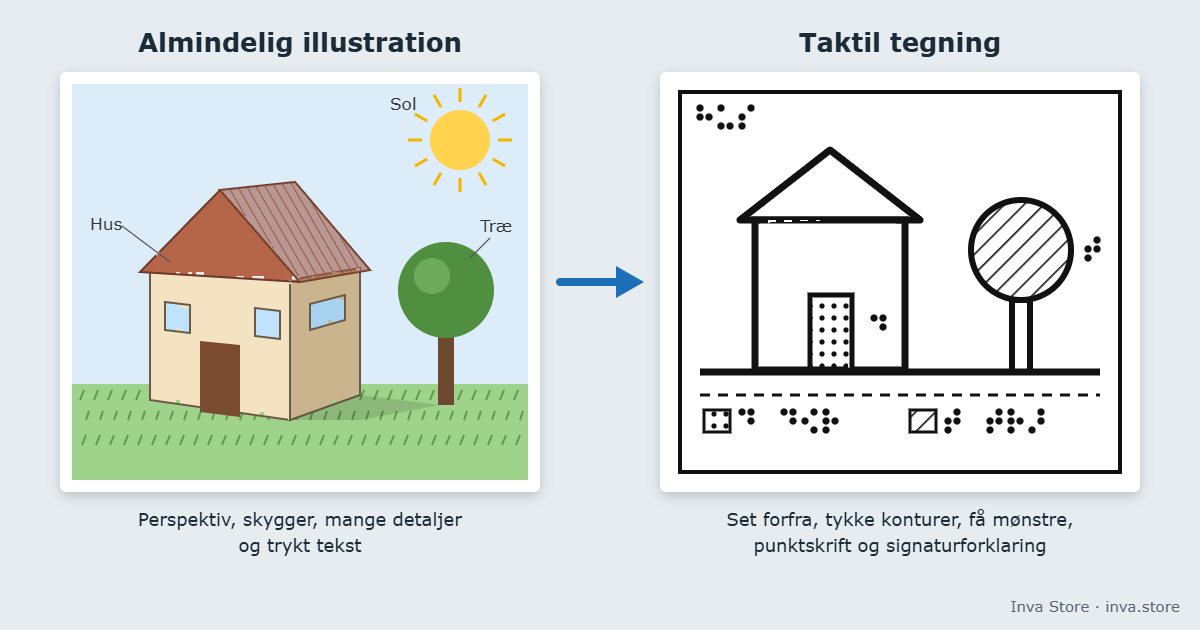
Short answer: A good tactile drawing is not a copy of the visual picture. It is simplified, enlarged and built so the fingers can find their way: few elements, enough space between them, braille instead of print and a key. The tips apply whether you make the drawing on swell paper, with a braille embosser or in another way.
Fingers read differently from eyes
The eyes see the whole picture at once. The fingers explore a small area at a time, and the reader has to put the whole together. That is why you can rarely just print an ordinary illustration on swell paper and expect it to be readable. The drawing has to be designed for the fingers – this is what professionals call tactile illustrations.
10 tips for tactile drawings
1. Start with the purpose
Ask: what should the reader be able to find or understand? Include only that. Keep to one or two main points per sheet, and split complex topics into several drawings.
2. Simplify – and remove decoration
Shadows, perspective, 3D effects, backgrounds and decorative frames are only noise under the fingers. Draw the object straight from above or from the side, with clear outlines.
3. Make it big enough
A4 is a good starting point, A3 when there are many details. Areas and symbols that must be told apart should be at least about 6 mm.
4. Keep your distance
Leave at least about 3 mm between lines, symbols and braille. On swell paper you may need about 6 mm, because elements that are close together easily feel like one.
5. Few line types and patterns
Use only as many different lines (solid, dashed, dotted) and area patterns as can clearly be told apart. Explain them in a key.
6. Avoid large black areas on swell paper
On swell paper, everything black rises. Large black areas become high and can bubble. Use a pattern instead, such as dots or hatching, and a lower heat.
7. Braille instead of print
Replace printed text with braille, and place the labels with space around the lines. If there is no room, use short abbreviations and explain them in the key – on the same sheet or on a separate sheet.
8. Title, frame and orientation
Put a braille title at the top, preferably in the same place on every sheet. A frame helps the reader find the edge, and on maps it is a good idea to mark north or a starting point.
9. Test before you make many
Make one sheet first, and ideally have it read by someone who uses braille every day – closing your own eyes is not the same. Write down the heat setting and line thickness so the next drawing turns out just as well.
10. Choose the right method
- Swell paper and a heater, such as the PIAF: fast and flexible. You can print, copy or draw by hand. The black must contain carbon – the toner in most laser printers and copiers does. With an inkjet printer, use true black; black mixed from colours does not rise. Good for maps, diagrams and teaching.
- Braille embosser with graphics: ViewPlus embossers emboss both braille and graphics, for example graphs and diagrams straight from Word and Excel with Tiger Software Suite. With the SpotDot you also get colour printing, so sighted and blind readers can use the same sheet.
- Thermoform (vacuum-formed plastic): durable relief copies when the same material is used many times.
Where can you find ready-made materials?
Free tactile maps, maths and science drawings from ViewPlus are described in our guide Tactile graphics in teaching – free materials. To get to know swell paper step by step, read How to make tactile graphics on swell paper.
Equipment for tactile drawings
- Swell paper from Harpo and Zychem in A4 and A3
- Harpo PIAF – heater for swell paper
- Braille embossers from ViewPlus, including the SpotDot with colour printing
- Tiger Software Suite 9
We sell to municipalities, schools, institutions and businesses in Denmark. Prices exclude VAT, and Danish public customers can pay by EAN invoice. Write to us if you are unsure which equipment suits your tasks.
Sources: Zychem, “Tactile graphics best practices”; Perkins School for the Blind, “Tips for creating raised-line images”; tactilegraphics.org, “Readability”; Braille Authority of North America, “Guidelines and Standards for Tactile Graphics” (2010).